Today was the first day of actual app code. By the end of the session, SessionClick was clicking on a real Android device. But before I describe what was built, I want to explain how it was built — because the workflow was as interesting as the result.
How this session actually worked
I’ve mentioned AI tooling in passing in earlier posts. Today it was front and centre, so it’s worth being specific.
The session involved three participants: me, Claude (Anthropic’s AI, running as a CLI tool called Claude Code), and Gemini (Google’s AI assistant, built into Android Studio).
The roles broke down roughly like this:
Claude handled architecture and supervision. Before any code was written, I described the problem — metronome timing consistency, the choice between Android audio APIs — and Claude laid out the tradeoffs, made a recommendation, and explained the reasoning. Once we agreed on an approach, Claude wrote the Kotlin interface and the Android stub, reviewed the code that Gemini generated, spotted a missing error handler, and fixed it. Claude also updated the project notes and wrote this blog post.
Gemini handled implementation inside Android Studio. Once Claude had given me a clear, specific prompt describing exactly what to build and why, I copy-pasted that prompt into Gemini’s chat panel. Gemini set up the CMake/NDK build, generated the C++ Oboe audio engine, and wired up the JNI boilerplate. It followed the prompt closely and got the structure right on the first attempt.
I directed traffic. I made the decisions that actually mattered — Oboe from the start, consistency over latency, NDK already installed — and I understood what was being built well enough to know when something was wrong. I copy-pasted prompts from Claude to Gemini, and results back from Gemini to Claude for review. I ran the build. I tested it on a real device. I rotated the phone and noticed the metronome stopped.
That last point is important: neither AI could test on a real device. That part was mine. Wow, now I feel great: Turning a phone and doing copy&paste. That’s my job. I really am a professional app developer now 💪🏼😂.
The honest summary: I wrote zero lines of code today. But I made every decision that shaped the code and the project. At least that gives me back a little amount of self respect.
(As you might imagine: Only the last sentences of the last two paragraphs are my own 😉.)
Choosing the audio engine
The core technical question for a metronome is: which Android audio API gives the most consistent click timing? Not just low latency — any music player can achieve that — but consistent inter-click intervals, regardless of what else the phone is doing.
Three candidates:
- AudioTrack (Java/Kotlin) — simplest, but timing is controlled by your code writing data to a buffer. Susceptible to OS scheduler jitter.
- AAudio (C++ NDK) — low latency, but requires you to manage the audio thread yourself.
- Oboe (C++ NDK, wraps AAudio and OpenSL ES) — Google’s recommended library for low-latency Android audio. Handles device compatibility and fallbacks automatically.
My input: I want Oboe from the start, I have NDK installed, min SDK is 28, and timing consistency matters more than start latency. Claude took those constraints and recommended the specific usage pattern within Oboe that makes consistency possible.
The callback model
Oboe offers two ways to get audio data to the speaker: you can push data by writing to a buffer in a loop, or Oboe can pull data by calling your code when it needs more. The pull model — called the DataCallback — is the right choice for a metronome.
In the callback model, Oboe’s audio thread calls onAudioReady() at regular intervals from a high-priority thread. That thread is managed by the audio subsystem, not the OS general scheduler. Notifications, background processes, and CPU throttling don’t touch it.
Inside the callback, we count frames instead of measuring wall-clock time:
framesPerBeat = sampleRate × 60 / BPMAt 120 BPM on a 48kHz device, that’s exactly 24,000 frames between clicks. The callback counts frames, and when the counter reaches framesPerBeat, it resets and triggers a click. Sample-accurate, no drift.
BPM changes are handled with a std::atomic<int> that the UI thread writes to freely. The recalculation only happens at beat boundaries inside the callback — changing BPM mid-beat would cut a click short.
Other Oboe settings that matter: PerformanceMode::LowLatency puts the stream on a dedicated audio path with smaller buffers. SharingMode::Exclusive avoids the system mixer adding overhead. Oboe falls back automatically if the device doesn’t support exclusive mode.
The implementation layers
Claude defined the architecture and wrote the Kotlin side. Gemini wrote the C++ side from a prompt Claude prepared. The layers:
shared/commonMain  →  AudioEngine interface (Claude, platform-agnostic)
composeApp/androidMain  →  AndroidAudioEngine.kt (Claude, thin JNI wrapper)
composeApp/androidMain/cpp  →  AudioEngine.cpp (Gemini, C++ Oboe callback)
The Kotlin interface defines four methods: start(bpm), stop(), setBpm(bpm), release(). The C++ implementation does all the real work. The Kotlin class just loads the native library and delegates via JNI.
When I pasted Gemini’s generated AudioEngine.cpp back into the Claude session for review, Claude spotted a gap: no stream error callback. If headphones are unplugged, the Oboe stream disconnects silently. Claude added an onErrorAfterClose handler that restarts the stream automatically.
Claude also wrote a FakeAudioEngine in shared/commonTest — an in-memory test double for use in future ViewModel and UI tests, so tests never need real audio hardware.
What broke, and what we learned
The good: audio kept playing when the app was sent to the background. Oboe’s audio thread keeps running regardless of app foreground state.
The bad: rotating the phone stopped the metronome. Android destroys and recreates the Activity on rotation, and the AudioEngine instance was tied to the Compose UI lifecycle. I noticed this, reported it, and Claude diagnosed it immediately: move the engine into a ViewModel, which survives configuration changes.
The real fix needed later: a ViewModel survives rotation but not indefinitely under memory pressure. For a stage-ready metronome — where you can’t have the click drop out mid-gig — the audio engine needs to run in an Android foreground Service with a persistent notification. That’s a Phase 2 task.
How it looks right now
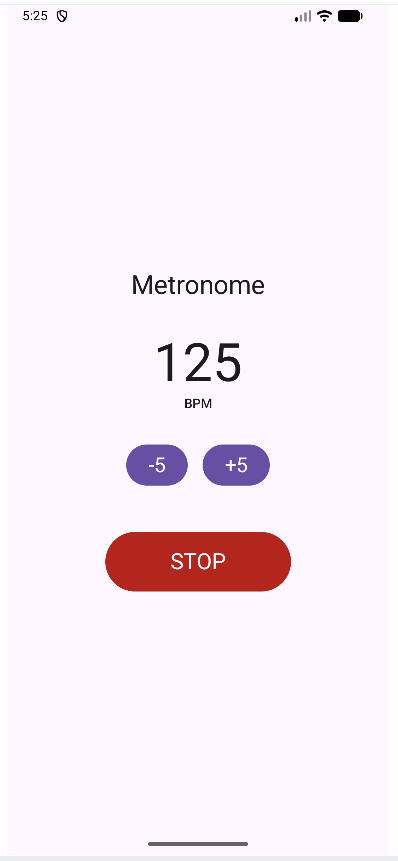
Minimal test UI generated by Gemini — BPM display, ±5 buttons, start/stop. The real UI comes in Phase 2.
What’s next
Phase 1 is done: the audio engine works on a real device with acceptable timing. Phase 2 is the actual Android app — BPM input, tap tempo, Stage Mode, song pool, setlists. The foreground Service is first on the list, before any UI work, because the audio lifecycle needs to be right before the UI is built around it.
Time spent today: 1h 51min
This blog documents my attempt to build and ship a music app as a solo developer, with AI assistance. The AI does a lot of the work. I try to be specific about what.