This is my original concept for the SessionClick main screen — written before any code was produced and without any AI assistance. The first prompt I used to start the project. And the screen Mockup and concept for usage. The prompt, the mockup and the feature descriptions are my own work.
Initial prompt:
I (Karl-Ernst Kiel) want to create a few music tools for Android and iOS smartphones and tablets. The first app will be a very simple metronome app. Things like an ear training app may follow.
The entire process should be carried out and managed with extensive AI support. I will be the only human working on the project. I am an engineer with skills in computer science, web technologies, Android and iOS coding, app distribution and online marketing. But I am no expert in any of these fields. I am also a hobby musician; I play keyboards in a band and sometimes drums. I already use similar apps to perform and learn music.
It will be very important to have good marketing for these apps, because there are many similar tools already in the field. There shall be free and paid versions of the apps, but the details of monetisation still need to be worked out.
I want to track the time I invest in this project using toggle. I will only have an average time budget of 30-60 minutes per day, not distributed evenly on each day. Mostly 1-3 hours on selected days. The costs must also be limited to no more than 40 EUR per month, e.g., for an AI account or tokens, hosting, and app distribution.
All activities like website(s) and email(s) should be handled via the domain “musicapps.eu”, which I have control of.
The whole project’s intention is to create useful apps, gain experience with AI tools, and determine whether it is possible to earn money with this kind of app.
I want to document all activities in a blog that should start as a personal blog in the first weeks and may become a public blog when the project is released. The blog’s intention is to keep a record of my activities, including AI activities, and build and document skills in using AI tools for software development and marketing.
What I think about the apps in general:
- I do not like online- or cloud-based apps. I prefer to have an app running independently on my device, without needing to log in or access the cloud while it runs.
- I do not like subscription models. I would always prefer to pay one-time fees instead.
- Native apps perform and “feel” better than web-based apps. Solid timing is essential for music apps.
- The apps’ look and feel should integrate into the Android or iOS ecosystem and design guidelines. There is no need to have a similar design on both platforms. Usability is more important than the look.
Some details about the metronome app:
- I saw a professional drummer using an existing metronome app in a very simple mode: Having only one beat per count, indicated by the same acoustic and optic sign on each beat. No differentiation of 4/4, 3/4 or 6/8 beats. Only one click, no special event “on the one”.
- This concept is the basis for my simple metronome app: You enter the speed in bpm (beats per minute). The app provides two signals at each beat—one optical flash and one acoustic sound.
- The app should support live gig playlists by providing a song pool with names and tempos, and allowing users to create and manage multiple playlists.
- It should be possible to export and import playlists.
- Features that go beyond the first MVP could include: Tactile feedback, integration with smartwatches, and synchronisation across multiple devices.
Next steps to set up the project infrastructure:
- Set up a blog (markdown-based) to document the project.
- Set up a virtual server to run OpenCLAW and an agent or agents to help me coordinate the project.
- Set up email and server accounts required to do this.
- Select the AI provider best suited for this project.
- Define the initial features of the metronome app.
- Conduct market analysis and develop a brand name, a product name, and a marketing strategy.
- Plan for coding the MVP version of the metronome app for Android (I want to code the Android version first to test the app and then code the iOS variant to release both at the same time)
Please help me refine the concept. You may ask questions regarding details. I am not very optimistic and prefer a more realistic, sceptical point of view.
Mockup
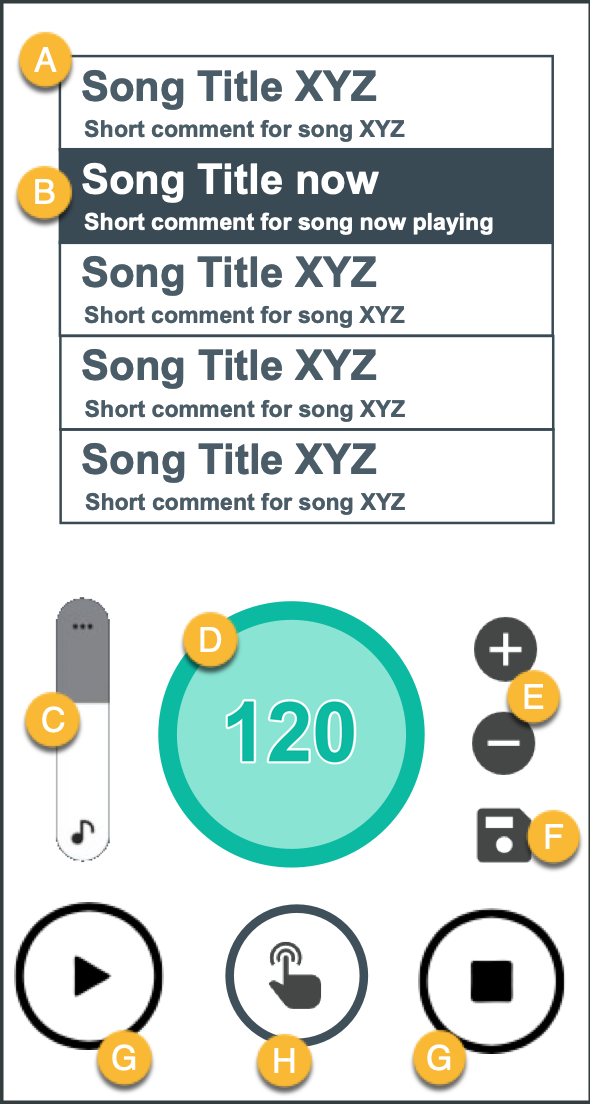
(A) The playlist
- The songs in the current playlist are shown here
- Scrollable up and down with a finger
- Short tap on a list item selects the song as the current
- The current song is highlighted (e.g. by inverting the text and background colours)
- The current one should always be displayed as the second from the top
- Long tap on a list item makes it movable up and down in the list
- Swipe to the left to delete an item
- Swipe to the right to edit the text
(B) A song record / list item
- Song title (limited to ~40 characters)
- The subtitle can hold any information — song or performance related. For example: “Wait for the singer to announce the song”, “Pause after this one”, “Count in 2 bars”
- Along with title and subtitle we store the tempo and the date the entry was edited. (The date will not be shown, but may be useful to sort the list of all songs.)
(C) Volume control
- It is important to have an instant volume control and not have to use the hardware buttons on the device. The volume will stay the same and not be saved for individual songs.
(D) The Tempo Flashlight
- Like a “big LED”, pulsing or blinking along the beat, synchronously to the sound
- The tempo to be shown in the centre of this area
- Even when the metronome is stopped and no sound is playing, just the ring should pulse with low light at the selected BPM — to get a feel for the tempo before starting the player
(E) +/− Buttons to change the tempo
- Will increment or decrement the current tempo by one
- On long press, the interval changes to 5
(F) Save tempo button
- Only appears after the tempo was changed by the +/− buttons (E)
- When pressed: stores the new tempo for the current song. When saved, the button disappears.
(G) Start and Stop buttons
- I would like to have two separate buttons
- When using one button for start and stop, you sometimes accidentally press it twice and the metronome does not start or stop as expected
(H) “Feel the beat” button
- Another feature that makes this app unique
- As long as you tap and hold this button, the device will vibrate along with the beat
- This should also be possible when the metronome is not playing
- Example use case: when I play in silent environments — e.g. on the piano, accompanying a singer — I often only want a hint of the tempo before I play the intro and do not want the app to make noise or flash a light
Playlists and the pool of all songs
The app should be able to handle an unlimited number of playlists.
Any song in a playlist is also part of the “song pool” — a list of all songs. Each song is a unique entry. If you edit a song in your current playlist it will also change in any other playlist that contains this song.
When I create a new playlist, I want to search and select songs from the list of all songs, or create a new entry.
In my playlist I also want to create “special entries” like “Pause”, “Speaker on stage”, or “Wait for special guest”. These should be special items with only one line of text. They must not be added to the list of all songs.
Open questions (at time of writing)
- How to add a song to a playlist?
- How do I select another playlist?
- How to delete and create playlists?